Showing posts with label pc. Show all posts

How To Install OS X Mavericks Hackintosh On PC

| 0 comments |
Want to install Mac OS X Mavericks Hackintosh on your PC? Thanks to the latest UniBeast release which adds support for Mavericks, you can now have best of both worlds (Windows and Mac) on your Intel-based PC.
The following guide will help you install OS X Mavericks v10.9 on your PC.
Mac OS X Mavericks

Requirements:
  • Access to Mac for downloading OS X Mavericks from MAS and creating UniBeast drive.
  • 8GB+ USB flash drive.
  • An Intel based PC capable of running Mavericks.
Guide on how to install OS X Mavericks Hackintosh on your PC:
Step 1: On your Mac, download OS X Mavericks for free from the Mac App Store. Make sure the downloaded installation file is in /Applications folder.
Mac OS X Installation
Step 2: Download the latest version of UniBeast and MultiBeast from here.
Step 3: Format your USB flash drive using Disk Utility on Mac with the following settings:
  • Start Disk Utility on Mac. Select your USB drive from the left hand column.
Mac OS Installation
  • Select the Partition tab from the right side. Click on Current dropdown menu and choose1 Partition.
  • Now click on Options… button, select Master Boot Record.
UniStep5
  • Type ‘USB’ as the Name for the drive. Select Mac OS Extended (Journaled) as Formattype.
Apple Mac OS
  • Once done, click on Apply followed by Partition.
Step 4: Now start UniBeast that you downloaded in Step 2 above.
Step 5: Skip through the first few screens by clicking Continue or Agree, until you get toDestination Select screen.
Mavericks Hackintosh 3
Step 6: Select your USB drive and click Continue to proceed.
Step 7: On Installation Type screen, make sure Mac App Store Mavericks – 10.9 is selected in packages. Additionally, select Legacy USB Support if you are using an old system with Socket 1156. Select Laptop Support package if you are installing it on a notebook PC. Once done, clickContinue, enter admin password for your Mac if prompted, and let UniBeast make a bootable Mavericks hackintosh USB flash drive for your PC.
UniBeast Mac App Store
Once done, move MultiBeast file that you downloaded in Step 2 above to this bootable Mavericks hackintosh USB drive (you will need this later).
Step 8: Now insert this bootable Mavericks hackintosh drive in your PC. Make sure the BIOS is set to boot the system from USB devices. When you boot from the USB drive, you will see Chimera boot screen, select “USB” and hit Enter on keyboard to continue.
Step 9: Once you are into OS X installer, you need to format the HDD you want to install Mavericks to using Disk Utility with the following settings:
  • On the menu bar, click on Utilities, then start Disk Utility.
  • Select the HDD you want to install OS X to from left hand side.
  • From right side, click on Partition tab, then click on Current dropdown menu and choose 1 Partition.
  • Now click on Options… button, choose GUID Partition Method.
  • Type ‘Macintosh HD’ as the Name for HDD. Select Mac OS Extended (Journaled) asFormat type.
  • Click on Apply followed by Partition to partition the drive.
Step 10: Once done, close the Disk Utility program, go back to the installer. Select “Macintosh HD” as the drive you want to install OS X to.
Macintosh
Click on Install for the installation to begin.
OS X
You’re almost there! Once the OS X installation is complete, you need to make this HDD bootable. This can be done using MultiBeast utility. MultiBeast can not only make OS X HDD bootable, but can also install the required drivers for audio, WiFi, graphics, LAN and more.
Step 11: Reboot your system again using the bootable Mavericks hacktintosh flash drive. From the Chimera boot screen, select “Macintosh HD” this time.
Step 12: Start MultiBeast, from here, choose all the drivers required for your PC. Once done, click on Build followed by Install to complete the installation.
MultiBeast
Mac OS Configuration
That’s it! You now have fully working OS X Mavericks installed on your PC.
Mavericks Hackintosh Installed

Source
Read More..

How to Connect Internet From Galaxy y Phone To PC or Laptop

| 0 comments |

"Hi Friends,
Please advise me How to connect my galaxy y phone internet to my PC using the Data cable."

This is my Friends E-mail. Most my friends ask me how to connect  internet From android phone to PC or laptop. It is simple, You can follow below simple steps.

  • : Install SAMSUNG Kies Software Your PC or Laptop.
  • : Connect your android phone to PC or Laptop using Data cable.
  • : Go to your Android phone Menu > Settings > Wireless and Networks 
  • : Select Mobile Networks > Tic Use packet data 
  • : Select Tethering and portable hotspot > Tic USB tethering
Now you can see your status bar blue icon and HSDPA icon. Now your android phone connected to internet. You can internet your PC or Laptop. Browsing and enjoy.  

Read More..

Don Bradman Cricket 14 for PC XBOX and PS3

| 0 comments |
Player endorsements are a big thing in cricket games – Allan Border, Brian Lara, Shane Warne and Ricky Ponting are just some of the players who have put their names to cricket games in the past – all greats of the game and all doing their bit to sell copies of games, but no one really worried about destroying Shane Warne’s reputation with a cricket game. Don Bradman – that’s different. The Don comes with a weight of history, a legendary status in the cricketing world and a name that defines cricket perfection. Putting that on a cricket game takes a lot of confidence, and developer Big Ant Studios think they have the game to live up to the biggest of names.

Don Bradman Cricket 14

Don Bradman

Cricket 14

Cricket


Releasing in 2014 on PC, PS3 and Xbox 360, Don Bradman Cricket 14 has spent nearly five years in development, funded and supported by CEO Ross Symons’ passion for the sport. Only recently to get wider distribution of the game has a deal been made with publisher HES, but Big Ant’s logo sits proudly on the front cover, unlike their previous titles.

To make the game the revolution it needs to be to match up with the name, it has a long list of firsts and total changes from the past – becoming the first cricket game with a full career mode, a built in player creator and the first with the ability to save games in progress online – finally making it viable to play a test match online in a cricket game. There is also innovation in control schemes, with batting and bowling all totally different from previous titles, all adding up to the impression that Big Ant may succeed at the finer points that previous titles have failed at.

The Sydney Cricket Ground and Bradman Oval are the two licensed stadiums in the game with a further eleven unlicensed grounds included from around the world.

While the game is still awaiting a release date, you can practice batting in the nets of theCricket Academy Beta. As well as being able to bat in the nets, you can also create players, tours, tournaments and unique match types, showing off some of the huge flexibility included in the game. Players created in the editor are able to be shared, including across platforms. The career mode will allow you to take your created player through a 20 year career, go on tours, get endorsements and earn your way into the national team. Other features included in the game are the ‘Big Ant Review System’ implementation of DRS, manual appealing, stats tracking as well as stamina, fatigue, injuries, form, etc. as factors in player performances.

Read More..

Bagaimana Download file APK Lewat PC

| 0 comments |

UPDATE ARTIKEL: Download APK langsung dengan Chrome Browser


Meskipun Google Play (sebelumnya Android Market) cukup dapat diandalkan, ada kalanya aplikasi tertentu tidak tersedia untuk di-download pada smartphone Android Anda karena berbagai alasan (misalnya: App mungkin tidak tersedia di negara kita, dll). Jika Anda berhadapan dengan masalah ini, jangan putus asa seperti sekarang, berkat alat yang unik dengan nama Leecher APK Real, Anda dapat men-download file. Apk dari Google Play untuk komputer Anda. Setelah itu selesai, yang terakhir adalah Anda tinggal mentransfer file dari komputer ke smartphone Android Anda.

Selanjutnya, saya akan menunjukkan kepada Anda bagaimana untuk menyelesaikan kedua tugas dengan tutorial, mudah langkah-demi-langkah.

Tahap 1: Men-download file APK pada komputer Anda.

Langkah 1:

Download alat APK Leecher Real. Gunakan link di sini atau di sini untuk mendapatkan arsip, kemudian unzip ke folder tujuan pilihan Anda di komputer Anda. Tidak ada proses instalasi, namun alat tersebut tidak membutuhkan Java Runtime Environment 1.5.0 untuk diinstal pada komputer Anda. Jika Anda tidak memilikinya (atau tidak yakin jika Anda melakukannya), jangan khawatir, karena Anda akan diminta untuk men-download ketika Anda menjalankan Leecher APK Real.

Langkah 2:

Pertama kali Anda menjalankan APK Leecher Real, Anda akan diminta untuk mengisi tiga bidang: alamat email dan password merujuk akun Gmail yang merupakan account utama pada smartphone Android Anda, dan ID perangkat. Jika Anda tahu bagaimana menemukan mereka semua, lompat ke langkah 4.


Langkah 3:
Selantutnya adalah mencari market account atau device id, yang dapat dilakukan dengan membuka dial pad pada smartphone Android Anda dan menekan

* # * # 8255 # * # *.

Ini akan membuka "Gtalk Service Monitor". yang ada di bawah "JID" adalah akun Google Play Anda. Dan yang setelah "Device ID: android-" adalah Device ID yang dimaksud.

Lihat screenshot yang ada di sebelah kiri. Setidaknya bisa membantu Anda jika penjelasan di atas tidak cukup atau anda merasa tidak mudeng. jika gambar tersebut terlalu kecil buka gambar besar

Langkah 4:


Sekarang yang perlu anda lakukan adalah mencari aplikasi Anda ingin men-download APK untuk (Anda dapat memilih untuk mencari kedua dengan nama aplikasi dan juga dengan nama vendor). Setelah Anda menemukan apa yang Anda cari, klik kanan dan pilih download. lihat gambar diatas. Dan aplikasi yang anda inginkan pun secara otomatis didownload ke PC lokal, lihat gambar di samping kanan:

Tahap 2: Mentransfer file APK ke smartphone Anda


Read More..

Free Download Outlast PC Game

| 0 comments |

Free Download Outlast PC Game 

Outlast PC Game
Outlast PC Game 
pc game, download free,Outlast free,Outlast pc game, Outlast download computer,Outlast review,Outlast release date
I will safely say that outlast created Pine Tree State stand out of my chair additional typically in its four-hour descent into Hell than the other game ever has. it is a tense, brutal trek that strips you of any power to defend yourself as you are attempting to avoid the insane mental patients that stray the halls of this horrifyingly attractive world.Youll run, hide, and simply typically be panicky as you discover the horrors that reside among Mount huge Asylum. however in between the wealth of scares and exquisite environments, outlast incorporates a tendency to hamper via uninspired mission objectives and many dis-satisfactory style decisions.
From the showtime, outlast is one amongst the best-looking and sounding survival horror games so far. Everything from the dynamic lighting to an incredible sounds-cape work along to stay you edgy each second of the expertise. I horrific getting into any new areas or gap any closed doors for worry of what lurked within the dark unknown. very little details that ar typically forgotten in games, like deed a path of bloody footprints once stepping through a pool of blood, extremely facilitate sell the illusion that Mount huge is associate actual place.
In the remote mountains of Colorado, horrors wait within Mount huge Asylum. A long-abandoned home for the unsound, recently re-opened by the "research and charity" branch of the multinational Murkoff Corporation, has been in operation in strict secrecy... until now.

Acting on a tip from an internal supply, freelance journalist Miles Upshur breaks into the ability, and what he discovers walks a alarming line being science and faith, nature and one thing else entirely. Once within, his solely hope of escape lies with the terrible truth at the center of Mount huge.

Outlast is one of most famous and played games. The reviews about Outlast are very positive and everyone had liked this game. If you also want to Download Outlast PC Game, Then click below given link and enjoy it playing for Free. Never forgot to share this game with Friends. If download link for Outlast game is not working then write in the comment box we will fix it in few days. Thanks for Visiting!
Outlast PC Game
Read More..

Game Far Cry 4 For PC SKIDROW

| 0 comments |
 Far Cry 4 SKIDROW COVER LOGO http://jembersantri.blogspot.com

Free Download Far Cry 4 PC Game SKIDROW Full Version Gratis : jika kemarin saya sudah memberikan kepada sobat jembersantri tempatnya download game terbaru tentang game Far Cry 3 reloaded, maka kali ini saya akan memberikan sebuah game update terbaru dari far cry ini, yaitu Far Cry 4 yang versi SKIDROW, jadi buat sobat para fans berat permainan far cry ini, saat ini sobat perlu berbahagia, karena game far cry 4 ini sangatlah lebih menarik dan tampilannya lebih bagus daripada versi sebelumnya.

Description Game Far Cry 4 Skidrow :

Melangkah ke tanah tidak bisa diketahui luas sekali lagi dalam permainan ini keempat dalam franchise Far Cry. Pemain menemukan dirinya dalam Kyrat, wilayah liar Himalaya berjuang di bawah rezim raja yg diangkat lalim. Menggunakan array yang luas dari senjata, kendaraan dan hewan, pemain akan menulis cerita mereka sendiri melintasi lanskap open-world eksotis. Dibangun dari DNA legendaris pendahulunya memenangkan penghargaan, Far Cry 4 memberikan yang paling luas dan mendalam pengalaman Far Cry pernah di dunia yang terbuka sama sekali baru dan besar dengan senjata baru, kendaraan, satwa liar dan banyak lagi.

Dalam Far Cry 4, Anda akan menaklukkan pos-pos benteng dari belakang gajah enam ton dan mengambil ke langit saat Anda hujan turun bahan peledak dari kursi girokopter Anda. Pemandangan vertikal Himalaya bukan hanya latar belakang cantik, tapi taman bermain yang mendorong pemain untuk melawan, berburu dan mengeksplorasi, bergulat sampai tebing atau meluncurkan ke udara, jatuh ke lembah di bawah ini dalam terjun bebas dikontrol dengan sayap Anda jas. Anda akan membawa dengan Anda persenjataan benar-benar unik persenjataan yang memungkinkan Anda bermain dengan cara Anda, apakah itu mengecam, menyelinap atau habis-habisan. Ketika semuanya gagal, hewan bisa menjadi sekutu terbesar Anda atau bahaya terbesar Anda, seperti padang gurun Kyrat yang memberikan pada janji pabrik anekdot dunia terbuka benar.

Features Far Cry 4 PC Games Full Version SKIDROW :

• REVOLUTIONARY OPEN WORLD CO-OP: Far Cry 4 allows for a second player to drop in and out at any point, re-imagining the cooperative experience in the true spirit of Far Cry for the next generation.
• MASSIVE OPEN WORLD: Discover the most diverse Far Cry world ever created. With terrain spanning from lush forests to the snowcapped Himalayas, the entire world is alive?and deadly.
• ABUNDANT NEW WILDLIFE: From leopards, rhinos, black eagles, and vicious honey badgers, as you embark on your hunt for resources, know that something may be hunting you.
• NEW WAYS TO GET AROUND: Scout enemy territory from above in the all-new gyrocopter and then plummet back to earth in your wing suit. Climb aboard the back of a six-ton elephant and unleash its raw power on your enemies.
• POWERFUL NEW WEAPONS: Choose the right weapon for the job, no matter how insane or unpredictable that job might be. With a diverse arsenal, you?ll be prepared for anything.

Free Download Far Cry 4 - SKIDROW PC Game Full Version

Screen Shot :

far cry 4 pc screenshot http://jembersantri.blogspot.com 1 Far Cry 4 SKIDROW
far cry 4 pc screenshothttp://jembersantri.blogspot.com 2 Far Cry 4 SKIDROW
far cry 4 pc screenshot http://jembersantri.blogspot.com 3 Far Cry 4 SKIDROW
far cry 4 pc screenshot http://jembersantri.blogspot.com 4 Far Cry 4 SKIDROW

far cry 4 pc screenshot http://jembersantri.blogspot.com 5 Far Cry 4 SKIDROW

Title: Far Cry 4 - SKIDROW
Genre: Action, Adventure, Shooter
Developer: Ubisoft Montreal, Ubisoft Kiev
Publisher: Ubisoft
Release Date: 18 Nov, 2014
Size: 26.71 GB / Split 28 part 999 MB Compressed
Mirrors: Mega.co.nz, MediaFire, UsersCloud, Uptobox, FileMup

System Requirements :
Minimum:
• OS: Windows® 7 (SP1) / Windows® 8 / Windows® 8.1 / (64-bit only)
• Processor: 2.6 GHz Intel® Core™ i5-750 or 3.2 GHz AMD Phenom™ II X4 955
• Memory: 4 GB RAM
• Graphics: NVIDIA GeForce GTX 460 or AMD Radeon HD5850 (1 GB VRAM)
• DirectX: Version 11
• Network: Broadband Internet connection
• Hard Drive: 30 GB available space
• Sound Card: DirectX-compatible (5.1 surround sound recommended)
• Additional Notes: Windows-compatible keyboard, mouse, optional controller (Xbox 360 Controller for Windows recommended)

 Recommended:
• OS: Windows® 7 (SP1) / Windows® 8 / Windows® 8.1 / (64-bit only)
• Processor: 2.5 GHz Intel® Core™ i5-2400S or 4.0 GHz AMD FX-8350 or better
• Memory: 8 GB RAM
• Graphics: NVIDIA GeForce GTX 680 or AMD Radeon R9 290X or better (2 GB VRAM)
• DirectX: Version 11
• Network: Broadband Internet connection
• Hard Drive: 30 GB available space
• Sound Card: DirectX-compatible (5.1 surround sound recommended)
• Additional Notes: Supported video cards at the time of release: NVIDIA GeForce GTX 460 or better, GeForce GTX 700 series; AMD Radeon HD5850 or better, Radeon R9 series. Note: Laptop versions of these cards may work but are NOT officially supported.

Download Link :


MEDIAFIRE
Far Cry 4-SKIDROW
CRACK FIX
Far Cry 4 Crack Fix-SKIDROW

Download Update Game Far Cry 4 Lainnya yang Terbaru :
  • Download Far Cry 4 v1.03 Update-SKIDROW
  • Download Far Cry 4 Proper-RELOADED
  • Download Far Cry 4 Update v1.4-RELOADED
  • Download Far Cry 4 [PC/MulTi2/v1.4] Repack by R.G. Mechanics
  • Download Far Cry 4 Update v1.5-RELOADED
 
Installation :
1. Unpack the release
2. Mount or burn image
3. Install
4. Copy everything from the SKIDROW folder into the game installation
5. Block the game in your firewall and mark our cracked content as secure/trusted in your antivirus program
6. Play the game
7. Support the companies, which software you actually enjoy!

 #Update1 Crack Fix
1. Unrar
2. Copy the crack content into the game installation
3. Play the game
Note: Found a small bug, casusing saving issues, here is a fix to solve that issue for those having the problem. Old saves wont work after this fix.

Demikian ulasan dari Jembersantri.blogspot.com tentang Game Far Cry 4 - SKIDROW For PC Full Version Crack Patch ini, semoga bisa bermanfaat buat sobat.
 
Anda sekarang telah mengunjungi :
Title :  Download Far Cry 4 For PC
Url :  http://jembersantri.blogspot.com/2014/11/far-cry-4-skidrow.html
Read More..

Dynasty Warriors 8 Xtreme Legends For PC BlackBox

| 0 comments |
Dynasty Warriors 8 Xtreme Legends For PC BlackBox by http://jembersantri.blogspot.com

Free Download Games Dynasty Warriors 8 Xtreme Legends For PC BlackBox Complete Edition : apa kabar semuanya nich sobat http://jembersantri.blogspot.com..?? mudah - mudahan pada baik - baik semua ya..!! kali ini saya akan memberikan sebuah game pc action petualangan terbaik dan paling banyak dimainkan oleh para gamers di seluruh dunia, khususnya para gamers di Negara kita tercinta Indonesia. game ini menceritakan sebuah pertempuran atau peperangan di Negara Wilayah Asia Timur sob. jadi saya jamin sangat seru banget gamenya ini. buat sobat yang masih belum pernah mencoba game Dynasty Warriors 8 Xtreme Legends For PC BlackBox ini, saya rasa sobat perlu banget mencobanya. 

Jika dibandingkan dengan versi sebelumnya dalam games Dynasty Warriors 8 Xtreme Legends For PC BlackBox ini memiliki grafik yang jauh lebih bagus, jadi anda tidak akan menyesal untuk download Dynasty Warriors 8 Xtreme Legends For PC BlackBox ini sekarang juga. Kali ini versi yang kami bagikan adalah versi blackbox, jadi ukurannya tidak terlalu besar, bahkan jauh lebih kecil dari versi reloadednya. Tetapi untuk gameplay anda tidak perlu khawatir, karena games Dynasty Warriors 8 Xtreme Legends For PC BlackBox ini tetap memiliki kualitas grafik dan gameplay yang sama dengan versi reloadednya.

Buruan deh sob di download gamenya ini, dan rasakan petualangan perang yang menegangkan. demi membela kebenaran yang sejati sebagai pejuang yang sejati.

Description :

The main mode in this latest installment in the Dynasty Warriors series is Story Mode, which follows the stories of the kingdoms of Wei, Wu, Shu, and Jin. This completely new story includes new episodes with all-new characters and takes an ever deeper look at the drama that unfolds in the Romance of the Three Kingdoms compared to previous titles in the series. There are also new What If? scenarios that take a look at what could have happened if famous characters of the time period had lived on to fight another day. Making their first appearance in the Dynasty Warriors series are highly anticipated officers from the Wei Kingdom, Yue Jin and Li Dian. Of course, we have also added plenty more new characters and old favorites such as Zhao Yun and Xiahou Dun are back for more for a total of 70+ playable characters — more than ever before!.

Screen Shot :


Dynasty Warriors 8 Xtreme Legends For PC BlackBox by http://jembersantri.blogspot.com
Dynasty Warriors 8 Xtreme Legends Complete Edition- BlackBox

Info :

  • Title: Dynasty Warriors 8 Xtreme Legends Complete Edition BlackBox
  • Genre: Action
  • Relaese Date: 13 May 2014
  • Developer: TECMO KOEI GAMES CO., LTD.
  • Publisher: TECMO KOEI GAMES CO., LTD.
  • Size: 4.7GB + Single Link
  • Mirror Download: Firedrive, Mediafire.

Download File :

Download Dynasty Warriors 8 Xtreme Legends For PC BlackBox - Single Link
-----------------------------------------------------------------
Download Dynasty Warriors 8 Xtreme Legends For PC BlackBox - Part 1
Download Dynasty Warriors 8 Xtreme Legends For PC BlackBox - Part 2
Download Dynasty Warriors 8 Xtreme Legends For PC BlackBox - Part 3
Download Dynasty Warriors 8 Xtreme Legends For PC BlackBox - Part 4
Download Dynasty Warriors 8 Xtreme Legends For PC BlackBox - Part 5    

Password RAR : http://jembersantri.blogspot.com 

System Requirements :

Minimum System Requirements Dynasty Warriors 8 Xtreme Legends:
  • OS: Windows Vista, Windows 7, Windows 8
  • Processor: Dual core CPU 2.4 GHz or better
  • Memory: 256 MB RAM
  • Graphics: NVIDIA ® GeForce ® 8600 or better
  • DirectX: Version 9.0c
  • Hard Drive: 18 GB available space
  • Sound Card: Standard audio device
Recomended system Dynasty Warriors 8 Xtreme Legends:
  • OS: Windows Vista, Windows 7, Windows 8
  • Processor: Quad core CPU 2.8 GHz or better
  • Memory: 512 MB ​​RAM
  • Graphics: NVIDIA ® GeForce ® GTX 460 or better
  • DirectX: Version 9.0c
  • Hard Drive: 18 GB available space
  • Sound Card: Standard audio device

Cara Install

  1. Ekstrack file yg telah anda download tadi
  2. Masukkan password rar yg telah tersedia diatas
  3. Jalankan "setup.exe" Install seperti biasa
  4. Buka folder yg bernama "Crack Fix 3DM"
  5. Copy file crack semua, kedalam folder installasi game tadi,
  6. Jalankan Crack.
  7. Enjoy.


Demikian postingan saya kali ini tentang Need For Speed Underground 2 RIP PC Games Gratis ini, semoga bisa bermanfaat dan menghibur sobat para gamers mania. buat sobat yang suka dengan game olahraga silahkan Download PES 2015 dan Need For Speed Underground 2 sob. semua gamenya gratis loh...


Anda saat ini telah mengunjungi :
Title :  Dynasty Warriors 8 Xtreme Legends
Url : http://jembersantri.blogspot.com/2014/12/dynasty-warriors-8-xtreme-legends-for-pc-blackbox.html
Read More..

Remote PC apk Review

| 0 comments |

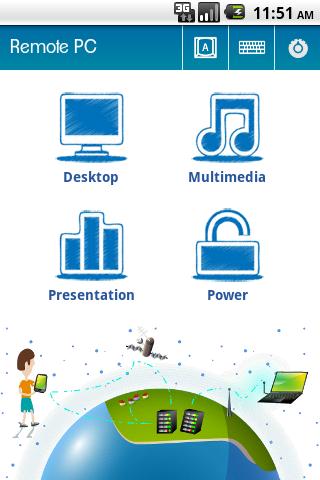
Remote PC apk
Remote PC apk

Current Version : 1.4
Requires Android : 2.0 and up
Category : Communication
Size : 2.5M

Original Post From http://www.blogspot.com


Remote PC apk Description


Remote PC is an application which allow you to remotely control your PC over Bluetooth or Wi-FI.

Get access to desktop's computer and use your favourite programs from distance. You can control mouse, keyboard (with functional keys and keyboard shortcuts), multimedia, presentation or power system commands.

DOWNLOAD SERVER:
http://www.androidremotepc.com/downloads/

Tutorial, support, general information find here:
http://www.androidremotepc.com/

Requirements:
• Java SE 6 or newer (32-bit, x86 platform) (http://www.java.com/en/download/)

How to connect:
1. Download the server to your computer from http://www.androidremotepc.com
2. Turn on Bluetooth, turn on Wi-Fi or join the network cable to the PC
3. Extract downloaded file and launch Remote PC Server.jar (*.exe)
4. Run the application in your mobile. Choose a connection −> select the computer from pairing list or type your PC's detected IP address and confirm −> wait for connection
• Detailed tutorials can be found at http://www.androidremotepc.com/tutorial/.

Support:
http://www.androidremotepc.com/support/
support@androidremotepc.com

Features:
• Remote Desktop
• Mouse
• Keyboard
• Functional keys and keyboard shortcuts
• Multimedia control (Clementine, iTunes, KMPlayer, PowerDVD 11, QuickTime Player, RealPlayer, Rhythmbox, VLC Media Player, Winamp, Windows Media Player)
• Presentation control (MS PowerPoint, OO Impress, Adobe Reader) with stopwatch
• System power control

This application controls multimedia players in contrast Bluetooth Remote PC (its free variation) even from BACKGROUND (not focused)!

Support the following operating systems:
• Windows 7 & 8 (x86, x64)
• Windows Vista (x86, x64)
• Windows XP
• Linux
• Mac OS X

Thank you for using my app and please write your comments and opinions on improvements.


Remote PC apk Videos and Images


Read More..