Showing posts with label remote. Show all posts

Smart IR Remote Samsung HTC Apk 1 4 3 Download

| 0 comments |
Smart-IR-Remote-Samsung-HTC-Apktablets.com_-500x250

Smart IR Remote Samsung & HTC 1.4.3 Apk Download


Requirement: 4.2 plus ahead

Overview: You can now use your call as being an Infrared separated (IR distant)

The reason should you ought to choose multiple separated for all the accessories you have ?

Using the clever InfraRed separated for the HTC an individual, you could add, establish also tailor a variety of remotes, mixing adjustments off all of your pre-existing remotes. Think about a single remote on which their ROUTE UP option settings personal preset peak pack from the TV provider, their SIZE techniques get a handle on your residence theatre process and the arrow tips manage every TV’s menu.

Over all that, given that you are maintaining one cell, you will want to usage a couple of it is extraordinary includes?

AUTOMATIC MUTE ANY TIME YOU find LABELED

Really don’t anyone don’t like this item once you be given a contact and yet can’t pick up on the other person considering that the Tv is just too loud? Currently, Smart isolated does instantly mute your current tool where anybody phone calls buyers.

ENERGETIC BULK – BETA

Smart online does successfully turn down any loudness where you can find sudden higher-bulk seems (know flick explosions), or maybe it’s going to turn up the size whenever audio are way too depressed to find out (think actors’ sounds not being loud required)

What new in Smart IR Remote Samsung & HTC 1.4.3 Apk:

big screen landscape (capsules) service!

ability to apply icons over gadget keys

power to include widget to lockscreen

complete things & macros

bugfixes to gains

Smart IR Remote Samsung & HTC Apk application does not have any advertisements

Smart IR Remote Samsung & HTC Apk 1.4.3 Download

Google Play Link

Download Link 1


Download Link 2
Read More..

Smart IR Remote Samsung HTC Apk 1 4 4 Download

| 0 comments |
Smart-IR-Remote-Samsung-HTC-Apktablets.com_1-500x250

Smart IR Remote Samsung & HTC Apk 1.4.4 Download

Requirement: 4.0.3 additionally awake

Review: Educated IR remote control, good infrared light distant app to Google portray, has grown to be return, additionally a lot better than actually!

Aided by the biggest wide variety (and greatest mix) from has, most breathtaking UI, most basic user interface then application circulation, plus compared with 500.000 helped systems (putting scores much more everyday), educated IR Remote is simply ideal IR isolated app online!

Right now suitable for most Samsung pills as well as notes transporting some kind of IR Blaster, together with most synonymous HTC gear.

Suitable for:

Samsung universe loss , Samsung Galaxy S4, Samsung universe notice, HTC any, and all the differences carrying a infrared light Blaster off Samsung to HTC.

!! MAIL US THROUGH ANY QUERIES as DILEMMAS YOU HAVE, WE MIGHT BE A LITTLE MORE THEN HAPPY TO MAKE IT EASIER TO. SADLY we all CAN’T PRESENT ASSIST Or possibly RESPONSE TO EACH RATING TO THE PORTRAY KEEP !!

Now you can make use of your contact being an Universal infrared light separated (IR separated)

Why is it best to want to go with more than one isolated for all the equipment you have ?

Using the brilliant remote control for the Samsung universe S4 (we all you should not basically maintain specialized ROMs so far), you can add, write & personalize numerous remotes, merging regulators by all of your pre-existing remotes. Picture one remote control by which the particular ROUTE away button manages your very own ready number one pack from the television lender, the particular VOLUME tactics controls the household theater mechanism and arrow tips reduce your TV’s selection.

Together with all that, given that you are maintaining a contact, why don’t you apply several of it is distinctive features?

environment GESTURES – one-of-a-kind for your cellphone!

Just keep ones application open up, and/or tide any hands preceding personal cell phone to improve stations (handled by properly) or perhaps amount (up and down)

PROGRAMMED MUTE ONCE YOU see KNOWN AS

Don’t a person detest one for those who get a contact simply can’t pick up your partner due to the fact Tv is too noisy? Then, informed online may successfully mute your present appliance while anybody contacts anyone.

FLYING ISOLATED (CHATHEAD)

The reasons why in the event you ought to switch over programs to give your command ? Energize Floating online in setup, while having the best cheated-method isolated presented just one single bit outside!

BACK-UP / REVIVE

Does someone change ROMs typically ? Or reinstall applications each day? Really backup/retrieve feature can help you salvage personal remotes, to get them backside whenever you apply yet again, with no need of browsing the actual installed procedure anymore!

MACROS

With our better advanced macro program, you are able to do a series of commands definitely one as soon as the other (just like switching on Tv, consequently switching into HDMI 1), add customizable delays concerning orders, as well as reorder all orders whilst you wanted.

COMPUTERIZED THINGS

More convenience inside modifying chores, just like shipping just about any charge you decide on (which include MUTE otherwise ELECTRIC POWER OFF) during a period of your finding, or even as soon as your contact bands. Go ahead and send us various other actions at which you want to deliver IR instructions!

Together with infrared light – IR Blaster – really required in your cellphone, the reasons why shouldn’t you make one particular from it? Smart Remote may handle personal TV, adjust peak package, light bulbs, Projectors, and so forth.. Practically something that offers an infrared light recipient might end up being handled by means of wise online with all the cure distant regulations. Furthermore we’re working 24/7 on adding a lot more!

Why not eliminate your very own Tv online, arranged leading package separated, furthermore house middle distant, all at one time ?

Can’t find any equipment within the helped record? Send people and also we’re going to look for they for your needs!

# Take note which because Samsung electronics restriction, automated knowing is not doable

Smart IR Remote Samsung & HTC Apk has NO promotions

Smart IR Remote Samsung & HTC Apk 1.4.4 Download

Google Play Link


Download Link
Read More..

Splashtop Remote Desktop v1 6 5 5 apk download v1 6 5 5 for Android

| 0 comments |
Splashtop Remote Desktop v1.6.5.5 for Android version 2.1 and higher.
Splashtop Remote Desktop is the ONLY remote desktop app capable of bringing full interactive video, audio, PowerPoint animations, and even 3D gaming to your Android phones or tablets!!


Splashtop Remote Desktop v1.6.5.5

** If you have an Android tablet based on Tegra2, we highly recommend you purchase Splashtop Remote Desktop "HD" version, fully optimized for tablet experience -- ALSO BIGGEST SUMMER SALES TODAY**

★★★★★ "Both a breakthrough and a bargain." -- The New York Times
★★★★★ "Splashtop Remote WINS hands down!" -- Apps for iPads

* Access your Outlook with folders and archives

* Access your PowerPoint with full animations and audio!

* Access your 100% compatible Excel and Word applications on your PC / MAC(Snow Leopard is required for Mac users)

* See and control your computer as if you are in front of it

* Watch Hulu FREE, AOL Video, Yahoo Video, and any Flash video sites, as well as access any video or music on your PC in any format

* Play Facebook Flash games like CityVille, FarmVille, FrontierVille, Pet Society, as well as 3D PC games

* Access all of your computer files and programs, include Microoft Outlook, Word, Excel, Powerpoint, as well as Quicken and PDF using 100% compatible, native applications

* Connect to multiple computers with the same app

* Interact with computer applications using intuitive touch controls and familiar Android gestures

Fast and easy setup:

* One-click access to your computer desktop with minimal setup

* Application finds your local computers automatically

* Tested on HTC Incredible, EVO, Desire (HD), Nexus One, MyTouch 4G, Motorola Droid, Xoom, Atrix, Samsung Galaxy Tab and Galaxy S, Dell Streak and Streak 7. Requires Android 2.2 or newer.
* Supports computers with all versions of Widows 7, Vista, and XP, including Home Premium, and Mac OS X 10.6

* Dual-core CPU strongly recommended for best performance

* Wi-Fi connection required

★★★★★ "Splashtop Remote is... extremely easy to setup" -- Pixelatedgeek.com

*** New features coming soon as an update:
* Seamlessly connect across a firewall, when the phone or tablet, and the PC are not on the same network

Whats New
v1.6.5.5
Support more resolutions, 1024x600, 1280x720, and remote computers native resolution.
New trackpad mode. Use 2 fingers tap to toggle between trackpad mode and conventional gesture mode.
In addition to 2 finger drag/slide, now you can scroll content using virtual mouse wheel.
Support Ice Cream Sandwich
Wake-on-LAN. Remote PC needs to be on wired LAN and WoL needs to be enabled through BIOS setting.
Share the app to friends.
New "Sharp & Smooth" mode.

More Info:
https://market.android.com/details?id=com.splashtop.remote


Download Instructions:
Splashtop Remote Desktop v1.6.5.5

Mirror:
http://www.MegaShare.com/3810107
Read More..

Download RDM Remote Desktop v2 1 2 APK

| 0 comments |
Download RDM+ Remote Desktop v2.1.2 APK. Access and control your Mac or Windows PC remotely right from your mobile device with RDM+ Remote Desktop app. Dont be tied to your home or office computer. Send and receive e-mails, edit documents, surf the web, manage files and do hundred other things that you usually do on your desktop, even when you are on a business trip or stuck in a traffic jam. Simply install mobile application on your Android and RDM+ Desktop on the remote computer and RDM+ is ready to use. No need to adjust any firewall or router settings.

mirror
Read More..

Remote PC apk Review

| 0 comments |

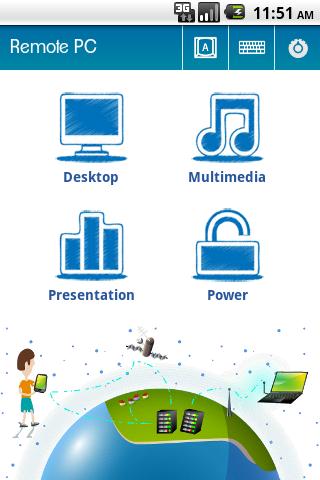
Remote PC apk
Remote PC apk

Current Version : 1.4
Requires Android : 2.0 and up
Category : Communication
Size : 2.5M

Original Post From http://www.blogspot.com


Remote PC apk Description


Remote PC is an application which allow you to remotely control your PC over Bluetooth or Wi-FI.

Get access to desktop's computer and use your favourite programs from distance. You can control mouse, keyboard (with functional keys and keyboard shortcuts), multimedia, presentation or power system commands.

DOWNLOAD SERVER:
http://www.androidremotepc.com/downloads/

Tutorial, support, general information find here:
http://www.androidremotepc.com/

Requirements:
• Java SE 6 or newer (32-bit, x86 platform) (http://www.java.com/en/download/)

How to connect:
1. Download the server to your computer from http://www.androidremotepc.com
2. Turn on Bluetooth, turn on Wi-Fi or join the network cable to the PC
3. Extract downloaded file and launch Remote PC Server.jar (*.exe)
4. Run the application in your mobile. Choose a connection −> select the computer from pairing list or type your PC's detected IP address and confirm −> wait for connection
• Detailed tutorials can be found at http://www.androidremotepc.com/tutorial/.

Support:
http://www.androidremotepc.com/support/
support@androidremotepc.com

Features:
• Remote Desktop
• Mouse
• Keyboard
• Functional keys and keyboard shortcuts
• Multimedia control (Clementine, iTunes, KMPlayer, PowerDVD 11, QuickTime Player, RealPlayer, Rhythmbox, VLC Media Player, Winamp, Windows Media Player)
• Presentation control (MS PowerPoint, OO Impress, Adobe Reader) with stopwatch
• System power control

This application controls multimedia players in contrast Bluetooth Remote PC (its free variation) even from BACKGROUND (not focused)!

Support the following operating systems:
• Windows 7 & 8 (x86, x64)
• Windows Vista (x86, x64)
• Windows XP
• Linux
• Mac OS X

Thank you for using my app and please write your comments and opinions on improvements.


Remote PC apk Videos and Images


Read More..